
PlexiChore
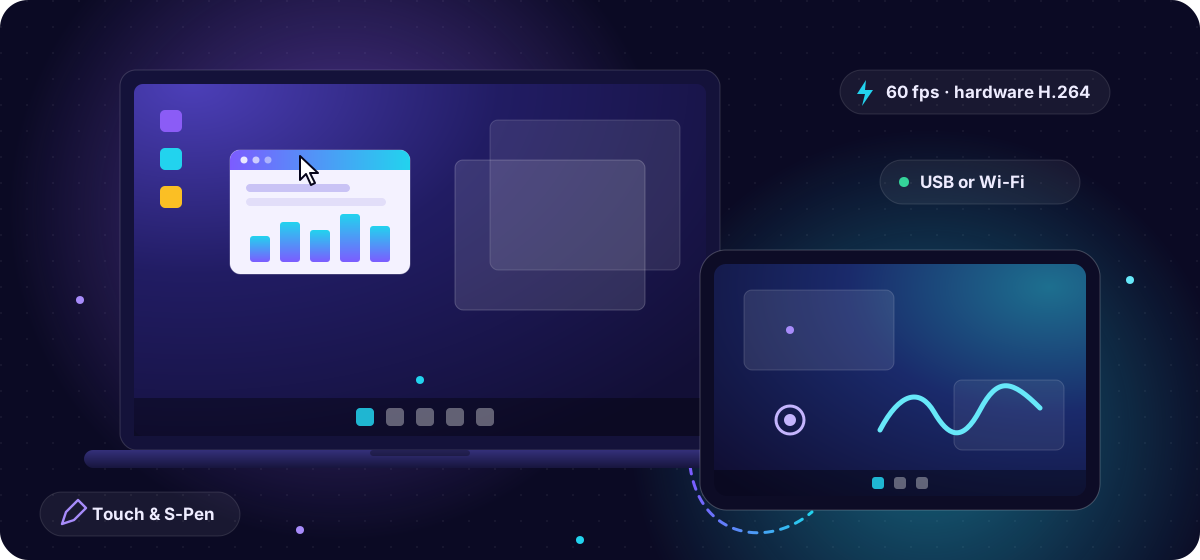
Turn any Android tablet into a portable monitor for your Windows PC or Mac.
Extend · Primary · Mirror — with touch and S-Pen, over USB or Wi-Fi.






All releases · Features · How to use · Build from source
Developed by PNT Apps · Free software under GPL-3.0 with attribution terms (NOTICE).
Three ways to use your tablet
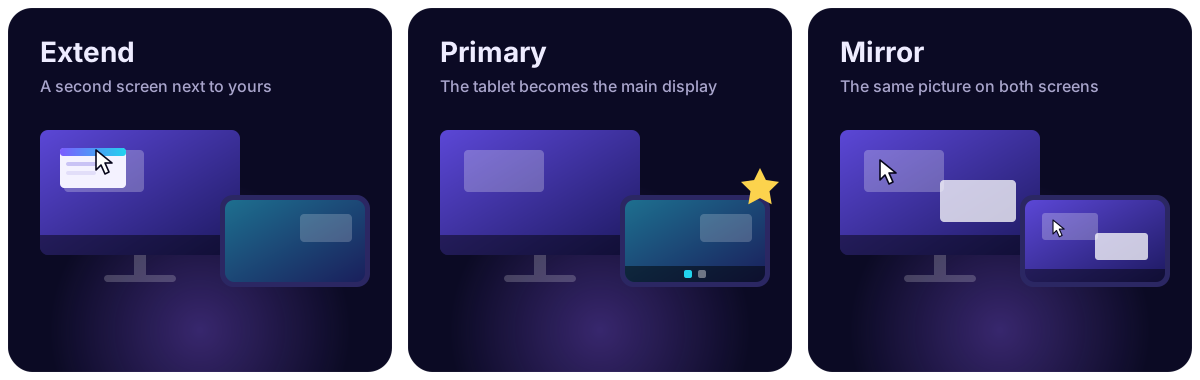
- Extend — the tablet is a second screen next to yours; drag windows onto it.
- Primary — the tablet becomes the main display (taskbar / menu bar move to it); your layout comes back when you disconnect. On Windows, with no monitor plugged in, the tablet is the main screen automatically.
- Mirror — the tablet shows the same picture as one of your screens.
How it works
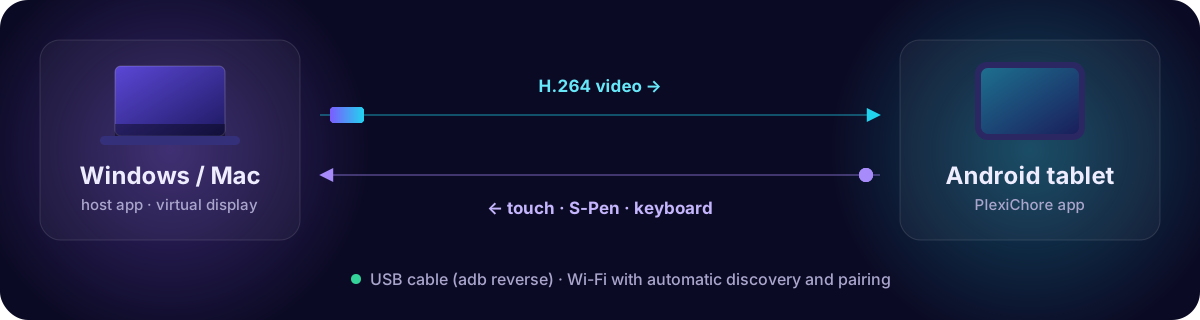
The computer runs a small host app that creates a virtual monitor (Windows: the signed open-source Virtual Display Driver; macOS: built in), captures it and streams hardware-encoded H.264 to the tablet (TCP 47800). Touch, S-Pen and keyboard input flow back. Connect with a USB cable (adb reverse, set up for you) or over Wi-Fi with automatic discovery (UDP 47801) and a one-time 4-digit pairing code.
Download
These links always download the newest version:
| You have | Download |
|---|---|
| Windows 10 (1809+) / 11 PC | Installer · portable exe (no install) |
| Mac (macOS 13+, Apple Silicon or Intel) | DMG (notarized) |
| Android tablet (Android 8+) | APK |
Release notes, checksums and older versions are on the Releases page.
Install the host on the computer and the app on the tablet, then see Using it.
Repository layout
| Folder | What | Status |
|---|---|---|
PlexiChore/ |
Android tablet app (Kotlin, Jetpack Compose, Material 3) | ✅ Working, tested on Galaxy Tab S8 |
PlexiChore-Desktop/ |
Windows host: .NET 10 WPF tray app + streaming engine + tools | ✅ Working, tested on Windows 10 19045 |
PlexiChore-Mac/ |
macOS host: Swift / SwiftUI menu-bar app | ✅ Working, tested on macOS 27 (Apple Silicon) with a Galaxy Tab S8 |
PROTOCOL.md |
Wire protocol shared by all three — the contract | Authoritative |
ROADMAP.md |
What is left, known limits, cleanup | Start here for next work |
CLAUDE.md |
Guide for Claude Code sessions continuing this project |
Features
- Three modes: Extend (virtual second monitor), Primary (tablet becomes the main display; original layout restored on disconnect, crash-safe), Mirror (any existing monitor).
- Portrait: rotating the tablet switches the virtual monitor to a portrait mode (1600×2560 etc.).
- Auto scaling: the tablet's virtual monitor gets a scale matching the tablet's density (200 % on a Tab S8); make text larger or smaller with − / + in the tablet's stream controls or Settings → Display size.
- Low latency: hardware H.264 (NVENC/QuickSync/AMF via Media Foundation, software and MJPEG fallbacks), Qualcomm/Exynos/MediaTek low-latency decoders, vsync-aligned frame pacing, sub-second connect.
- Transports: USB cable (adb reverse, auto-applied by the desktop app; USB tethering supported), Wi-Fi with automatic discovery and 4-digit pairing, manual IP.
- Input: multi-touch, S-Pen (pressure/tilt/hover/barrel/eraser), touch-as-mouse mode, scroll.
- Compatibility: Android 8–17, phones to 14.6" tablets, foldables, DeX, Fire OS (no Google services), decoder capability negotiation with fallback chain.
- Safety net: an emergency key releases the tablet display instantly if anything goes wrong (Mac: ⌃⌥⌘D); Primary hands the main display back on disconnect, quit or crash.
- Help built in: troubleshooting pages in the tablet app and in the Mac app (Help page + menu bar).
Mac host specifics
- Virtual display via macOS's
CGVirtualDisplay(no driver to install); VideoToolbox hardware H.264. - Lid closed: optional Keep the tablet on with the lid closed (Extended display → Options; charger connected) lets the tablet stay your only screen.
- Distributed as a notarized, universal (Apple Silicon + Intel) DMG — outside the Mac App Store, because it uses a private display API and input injection.
- Needs Screen Recording, Accessibility and Local Network permissions on first launch.
Measured on Galaxy Tab S8 + GeForce GT 710 over USB: ~60 fps desktop/cursor motion in all modes, 51–55 fps full-screen video in extend (GPU-limited), ~3 ms RTT, 0.4–1 s tap-to-picture. Measured on Galaxy Tab S8 + MacBook Air (Apple Silicon, macOS 27) over USB with H.264: ~58 fps cursor motion, 3–15 ms RTT, ~0.4–1.6 s tap-to-picture.
Quick start
Windows host
Requirements: Windows 10 1809+ (tested 19045), .NET 10 SDK to build.
cd PlexiChore-Desktop
dotnet build PlexiChore.slnx -m:1
dotnet test  PlexiChore.slnx
powershell -File publish.ps1          # → dist\PlexiChore.exe (self-contained, single file)
Run dist\PlexiChore.exe (lives in the tray). For Extend/Primary click Extended display → Install once (installs the signed open-source Virtual Display Driver, one UAC prompt). See PlexiChore-Desktop/README.md and PlexiChore-Desktop/driver/README.md.
Android app
Requirements: Android Studio / JDK 17+ (Android Studio's JBR works), Android SDK 37.
cd PlexiChore
./gradlew assembleDebug
adb install -r app/build/outputs/apk/debug/app-debug.apk
Mac host
Requirements: macOS 13+ to run; Xcode 15+ / Swift 5.9+ toolchain to build (tested with Swift 6.4 on macOS 27).
cd PlexiChore-Mac
swift build && swift test                     # or open Package.swift in Xcode
./scripts/build-app.sh                        # → build/PlexiChore.app (dev-signed)
# release: Developer ID + notarization
SIGN_IDENTITY="Developer ID Application: …" UNIVERSAL=1 ./scripts/build-app.sh
SIGN_IDENTITY="Developer ID Application: …" ./scripts/package-dmg.sh
./scripts/notarize.sh build/PlexiChore-<version>.dmg   # needs the 'plexichore-notary' keychain profile
Using it
- Start PlexiChore on the computer — Windows: the tray app (Start with Windows in Settings); Mac: open the DMG, drag PlexiChore to Applications, open it and grant Screen Recording, Accessibility and Local Network (Open at login in Settings).
- USB: enable USB debugging on the tablet, plug in, accept the prompt. Wi-Fi: same network; approve the 4-digit code on the computer the first time.
- Open PlexiChore on the tablet, pick Extend / Primary / Mirror, tap Connect.
- While streaming: swipe down from the top edge or 3-finger tap for controls (disconnect, − / + display size, touch mode, stats).
- If the screen ever looks wrong: Mac — press ⌃⌥⌘D (or menu bar → Release Extended Display); Windows — disconnect from the tray. Both apps have a Help page with more fixes.
Known limits
See ROADMAP.md. Highlights: full-screen video is GPU-limited on weak GPUs; the Windows virtual display driver needs a short (≤ ~48) mode list; on the Mac, rotation and scale changes re-create the virtual display (~1 s blank) and the host is not App Store eligible. Still to verify by hand: pinch, two-finger scroll/right-click, S-Pen pressure on the Mac, sleep/wake, an Intel Mac.
Credit to PNT Apps — required
If you use, fork, modify or redistribute PlexiChore, you must keep the credit to PNT Apps:
- in your README or main documentation: "Developed by PNT Apps — https://www.pntapps.com", and
- inside each app, where users can see it (for example an About or Settings screen): "Developed by PNT Apps" linking to https://www.pntapps.com.
You may add your own credits next to it. This is an additional term of the license (GPL-3.0, section 7(b)); see NOTICE.
A modified version must not be presented as the original PlexiChore, and the names "PNT Apps" and "PlexiChore" and their logos/icons may not be used as the name or icon of your app.
License
Copyright © 2026 PNT Apps.
PlexiChore — the Android app, the Windows host and the macOS host — is licensed under the GNU General Public License v3.0 (LICENSE) with the additional attribution terms in NOTICE.
In short: you may use, study, change and share PlexiChore, but if you distribute it or a modified version, you must release your source code under the same GPL-3.0 license (including the attribution terms) and keep the credit to PNT Apps.
Third party: fonts (Inter, Space Grotesk) are under the SIL Open Font License 1.1; Android libraries under Apache 2.0; Windows libraries under MIT. The Virtual Display Driver (MIT), nefcon (BSD-3) and adb are downloaded at install time, not bundled — see NOTICE and PlexiChore-Desktop/driver/README.md.